TABLE OF CONTENTS
- General CPDLC usage
- ATC vs ACARS/CPDLC issues
- My plane doesn’t work……
- The ACARS Bridge
General CPDLC usage
The following page outlines the basic usage of the SayIntentions.AI CPDLC system:
This video highlights the basic rules:
https://www.youtube.com/watch?v=Q5M5ok1nIOM
ATC vs ACARS/CPDLC issues
Occasionally a user may receive an unexpected or incorrect message through the ACARS network. In many instances this stems from an issue within the backend systems rather than the network itself.
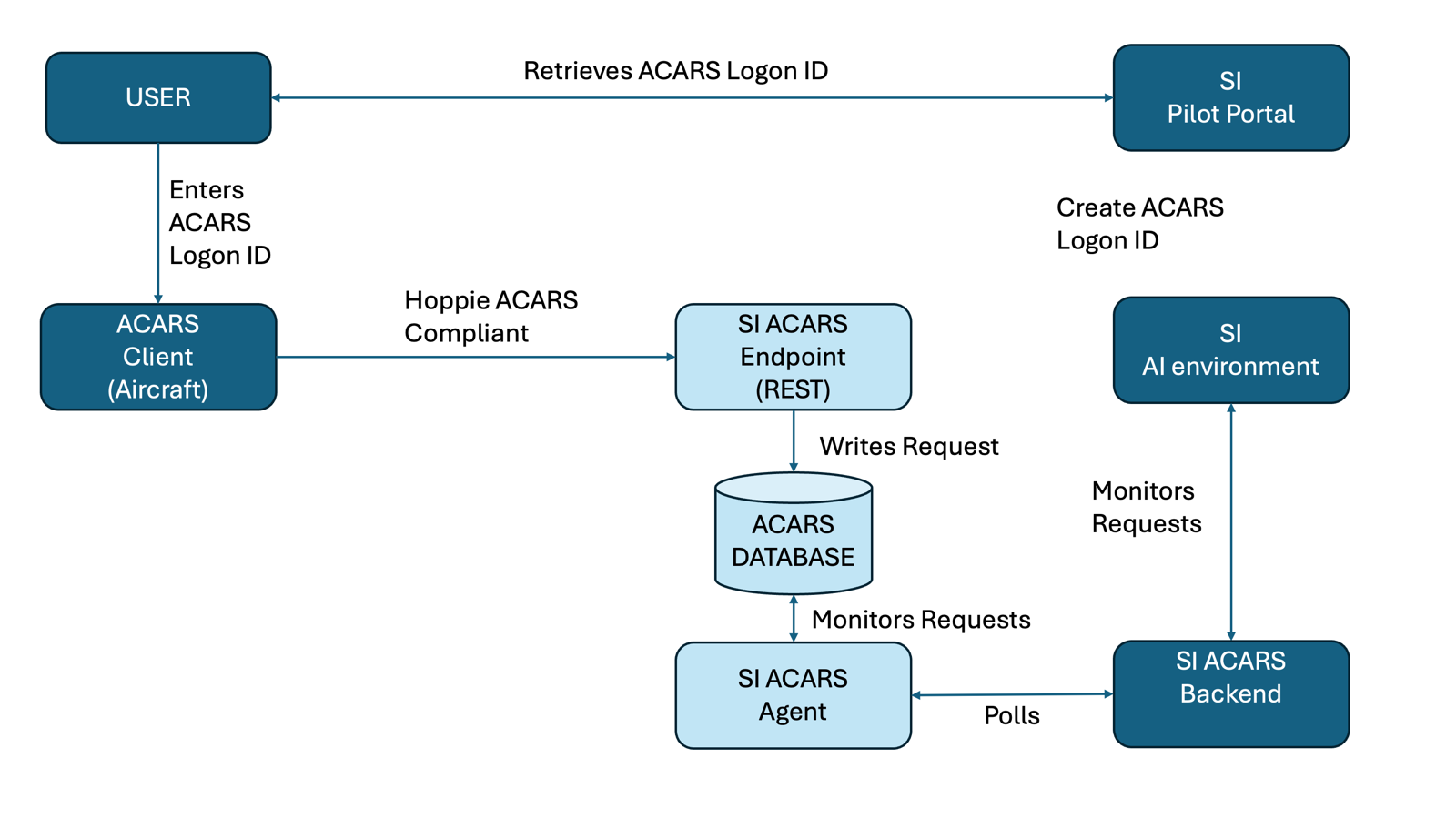
The ACARS Network architecture
The network functions purely as a transport layer: it typically delivers whatever the backend sends, without altering or interpreting the content. When a backend service produces an erroneous or unexpected output, the aircraft will still receive it correctly, often giving the impression that the network is at fault when the underlying cause lies within the SI ATC components.
When this occurs, it is often necessary to raise a support ticket so the wider team can investigate the backend behaviour and trace the origin of the message.
If your aircraft is receiving messages without difficulty, submitting a ticket is the most effective way to ensure the issue reaches the appropriate support team. Should the problem appear related to CPDLC/ACARS specifically, the relevant team will be notified automatically as part of that process.
My plane doesn’t work……
When someone reports that their aircraft “doesn’t work,” it is one of the most common messages we receive, yet also one of the most difficult to diagnose without basic information.
We always aim to help, but to do so effectively we need enough detail to understand whether the problem lies with the overall ACARS network, with a specific aircraft type, or with your particular flight.
With most aircraft issues, we can contact the devs if a common fault is found after a major release; often it is easier for individual customers of those developers to report it themselves, as the volume of reports may increase the priority of the resolution.
The network maintains a rolling 24-hour log of all ACARS messages sent and received. Before reporting an issue, it is helpful to run a few quick checks.
Review the ACARS Logs
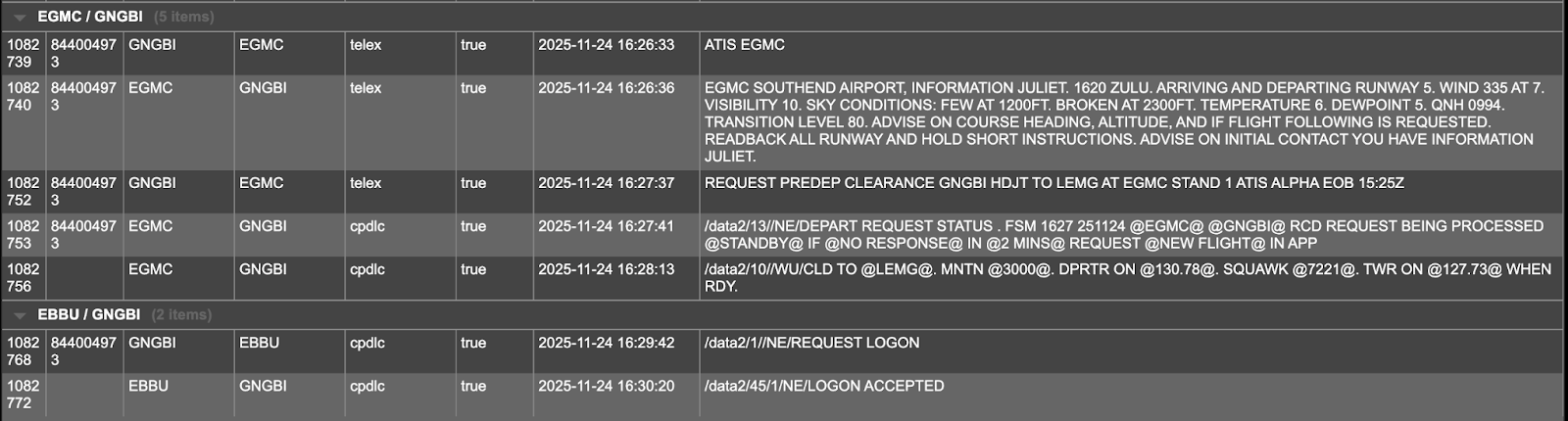
Begin by reviewing the dump page at:https://acars.sayintentions.ai/dump?callsign=YourCallsign.
This allows you to confirm whether messages from your aircraft are reaching the servers and whether responses are being returned. You can also see whether both ends are reading the messages correctly. If your callsign appears in red, the system recognises that you are online.
If you see an issue, download the csv log (top right download icon) and submit it with the fault report.
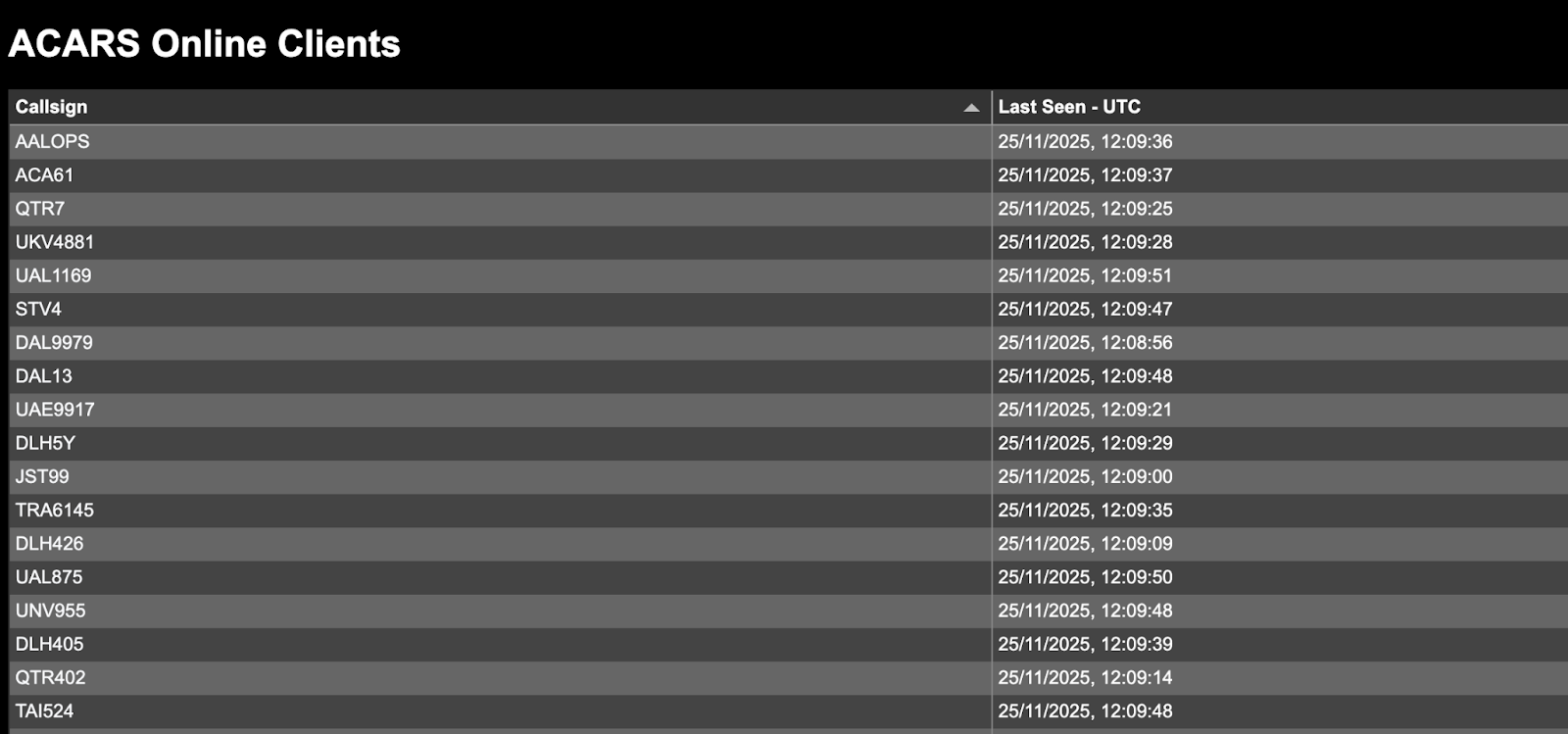
Check the aircraft is polling the network
Check: https://acars.sayintentions.ai/stations To see whether your aircraft is connected to the network. Click on callsign to open the message log, an aircraft maybe polling but not sending messages.
If it is not polling, the issue is likely to lie within the aircraft’s setup. We provide YouTube guides for the most widely used aircraft to help with this.
Check Flight Sim Messenger (FSM)
Check https://fsm.vsrsoftware.com To eliminate issues and to pinpoint whether a problem originates with the aircraft, the server, or your account. Close the browser window once you have reviewed the logs to avoid leaving unnecessary sessions open and stop your aircraft client from polling.
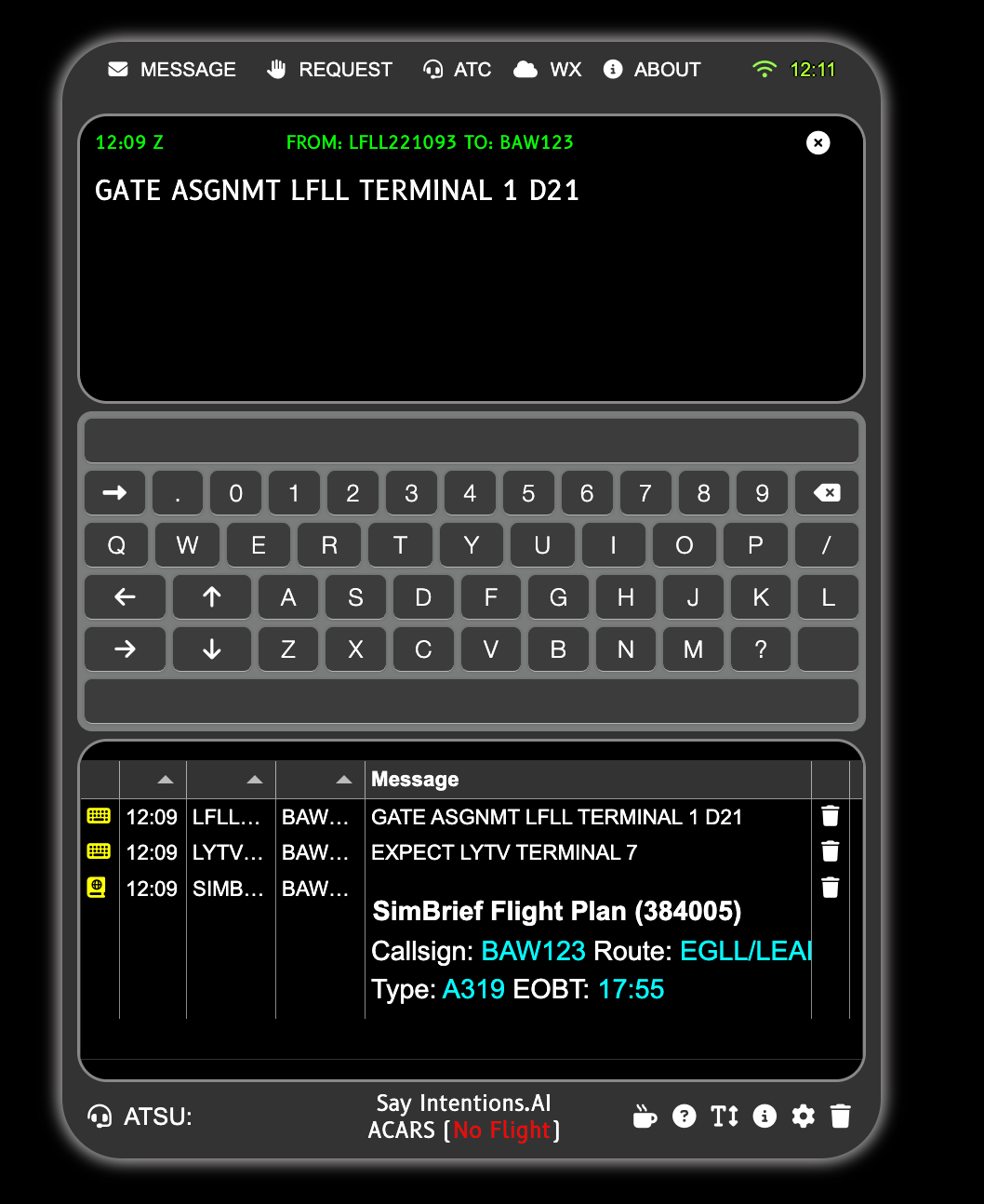
After completing these initial checks, please report any outstanding issues along with your findings so that we can assist more effectively.
Specific aircraft
FENIX A3XX
https://www.youtube.com/watch?v=ePDCSW0zVjM
Fenix A3XX users sometimes encounter problems where the aircraft appears on the network but does not poll correctly, usually because the flight number sent via ACARS does not match the one entered on the INIT A page. This mismatch can prevent the aircraft from registering properly with the CPDLC/ACARS network and may lead to symptoms such as intermittent polling, no uplinks, or the appearance that “nothing is working.”
A few points help identify and resolve these issues:
Some aircraft allow a callsign on one page and a flight number on another. In the Fenix, however, any mismatch, whether a missing prefix, an airline code typed differently can create issues. Therefore check the flight number on the INIT A page matches the one in the flight plan.
Cross-checking the dump page with the stations page is often the quickest way to detect this problem. If messages from the servers are unread, or the aircraft isn’t online typically points to this issue.
Correcting the flight number on the INIT A page normally resolves the issue.
If you continue to experience problems after verifying that the INIT A flight number and callsign match exactly, then follow the instructions for debugging and reporting.
Retrieving SayIntentions ATIS information for the FENIX
As at 25/11/25 the FENIX aircraft do not retrieve SayIntentions ATIS information. To retrieve our ATIS information send a company/Free Text (AOC) message to the ICAO of the airport with the content ATIS ICAO, e.g.
TO: EHRD
CONTENT: ATIS EHRD
This will return the EHRD ATIS as a text/telex message, these interactions can be checked on the acars dump page.

PMDG 777
https://www.youtube.com/watch?v=rTxAjBiK72A
Users occasionally experience situations where the PMDG aircraft appears not to send any messages at all. In many cases this is resolved simply by re-entering the SI Key in the EFB, then switching the network setting to NONE before returning it to SI. This forces the aircraft to refresh its configuration and re-establish its link.
PMDG routes CPDLC traffic through its own intermediary infrastructure before it reaches external networks. As a result, some interruptions cannot be traced from our side and may clear on their own once their systems recover. If you suspect this is the case, it is worth checking PMDG’s support channels for any ongoing advisories or temporary outages.
INIBUILDS A35X
https://www.youtube.com/watch?v=qDCd2aXvlsk
We often receive reports of intermittent issues; please check through our CPDLC channel to determine if this is a common issue, and check logs before reporting.
If you have a greyed-out notify button on an Ini A350 you cannot logon, try entering 000000 as HOPPIE ID in the EFB, but select SI as network. Seems it may need something in the HOPPIE field [as at 12/12/25]
PocketSky CPDLC Client
PocketSky now has a CPDLC client based on fsm.vsrsoftware.com. You can use it as a standalone CLDLC client or respond to messages if your aircraft is already polling. It gives you a full CPDLC mobile client when you are flying an aircraft without CPDLC functionality
The PocketSky CPDLC client element does not run when it’s not in focus, but you will get push notifications of CPDLC messages from ATC you can then open the client if you wish to respond. You may not get push notifications of ACARS/TELEX/COMPANY messages sent to you directly from some Virtual Airlines, but these will still be displayed in the client.
If you are running an existing aircraft client, then it is best that you log onto CPDLC from the aircraft, not from PocketSky, the reason is that some aircraft will not react to “LOGON Accepted” messages unless they initiated the request.
The PocketSky CPDLC client will leave the messages sent to you as unread on the ACARS server; this is intentional, as it allows your aircraft to retrieve these messages themselves.
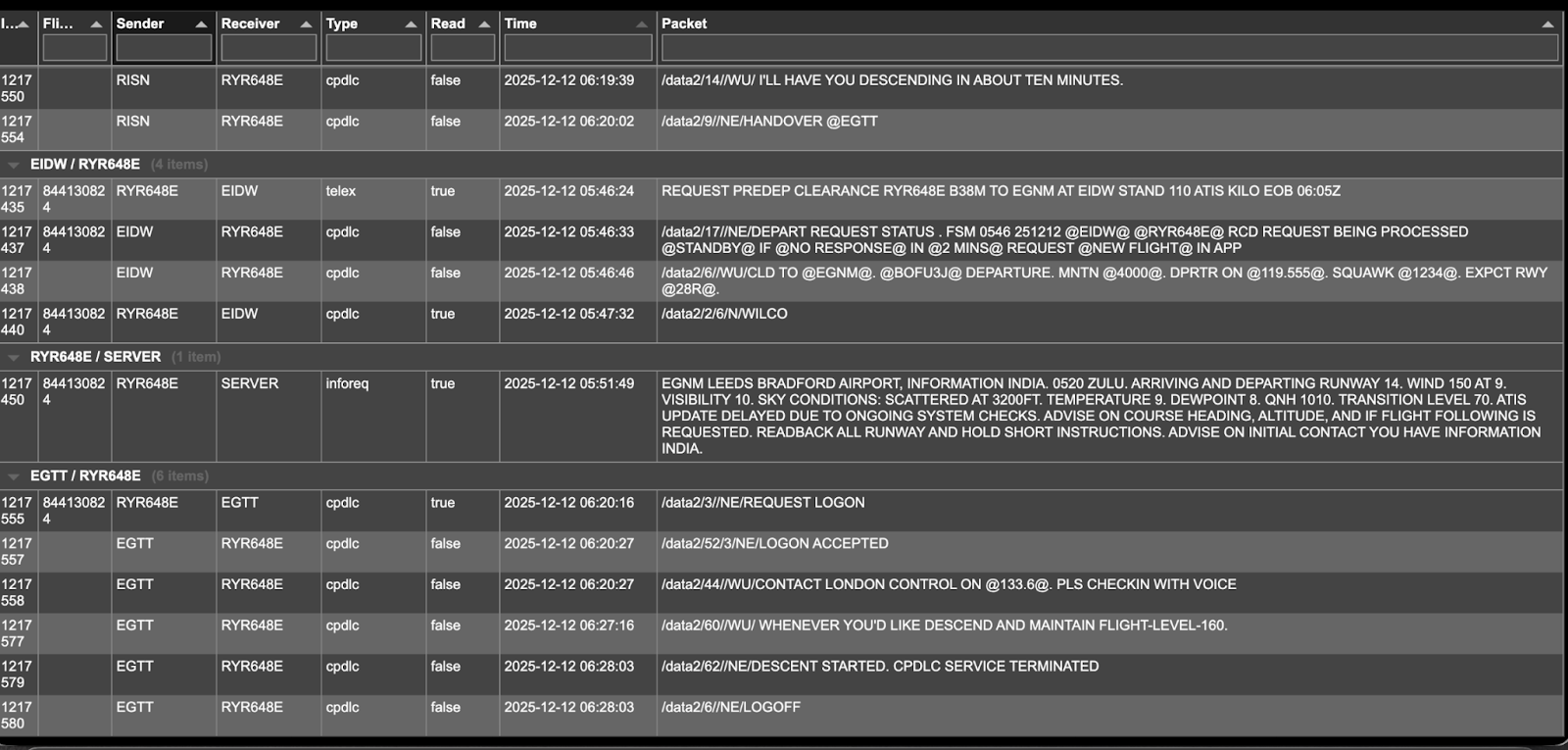
The following demonstrates a fully function set of CPDLC transmissions, with the read flag still set as false:
General Questions
Why does my co-pilot change the frequency too soon?
The reason a copilot changes when the message is issued, rather than when your plane displays it is that your aircraft polls independently for messages, we have no control over the polling interval and the backend doesn’t know when it’s been displayed/read.
If we delayed it then people would then complain that the copilot is slow, because your aircraft’s poll interval can be quite long and is unknown to the backend.
Also, very often people leave their aircraft unattended and don’t even respond with Wilco (more often than you’d realise), in which case the frequency would never be changed as the pilot never acknowledged.
Sometimes the ATSU from the CPDLC handover seems wrong
We source our airspace data from 3rd parties, which can sometimes be inaccurate, especially in oceanic areas as we rely on their boundaries and labels. For instance, the area between Japanese airspace and Alaska is known to have issues.
This can lead to incorrect labels and rarely, handovers. It should not functionally affect CPDLC and you will still receive messages, albeit from the “wrong” ATSU. It’s an immersion rather than a functional CPDLC issue.
CPDLC Handovers are not working correctly
The correct handover sequence is as follows:
ATC sends Handover [new ATSU]
Aircraft logs off (optional) - some also send “Disconnect “
Aircraft sends CPDLC Logon request to the new ATSU
ATC sends Logon accepted as new ATSU
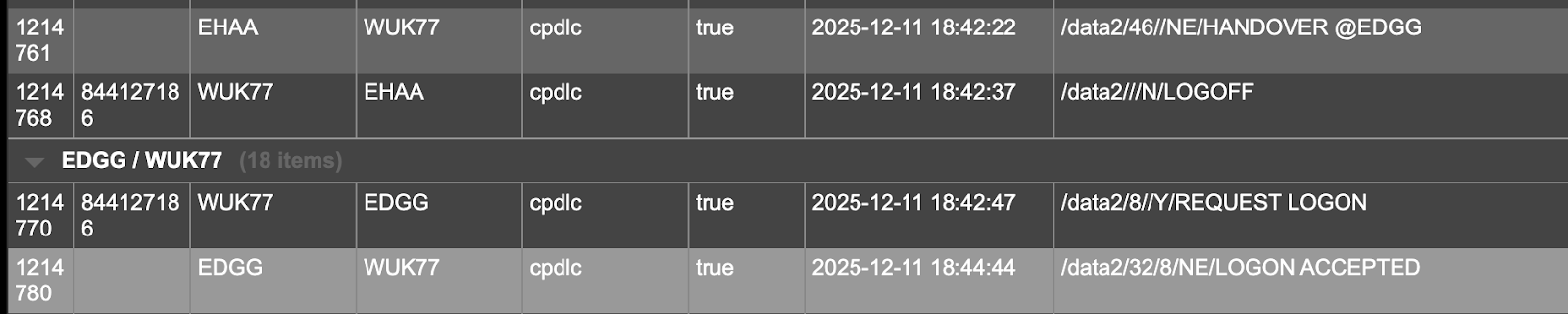
Your aircraft developer may not have implemented the logic for handovers; please check the logs to determine whether the aircraft has responded correctly. Otherwise you will need to logon to the next ATSU manually, if you forget CPDLC will still continue with the previous ATSU.
Please contact your aircraft developer if the sequencing appears incorrect
The ACARS Bridge
The ACARS Bridge enables you to send and receive Pre-departure clearance and CPDLC requests with SayIntentions.AI's ATC whilst remaining on Hoppie’s ACARS network. This is typically when direct communication with SayIntentions.AI's ACARS network from your aircraft isn’t possible.
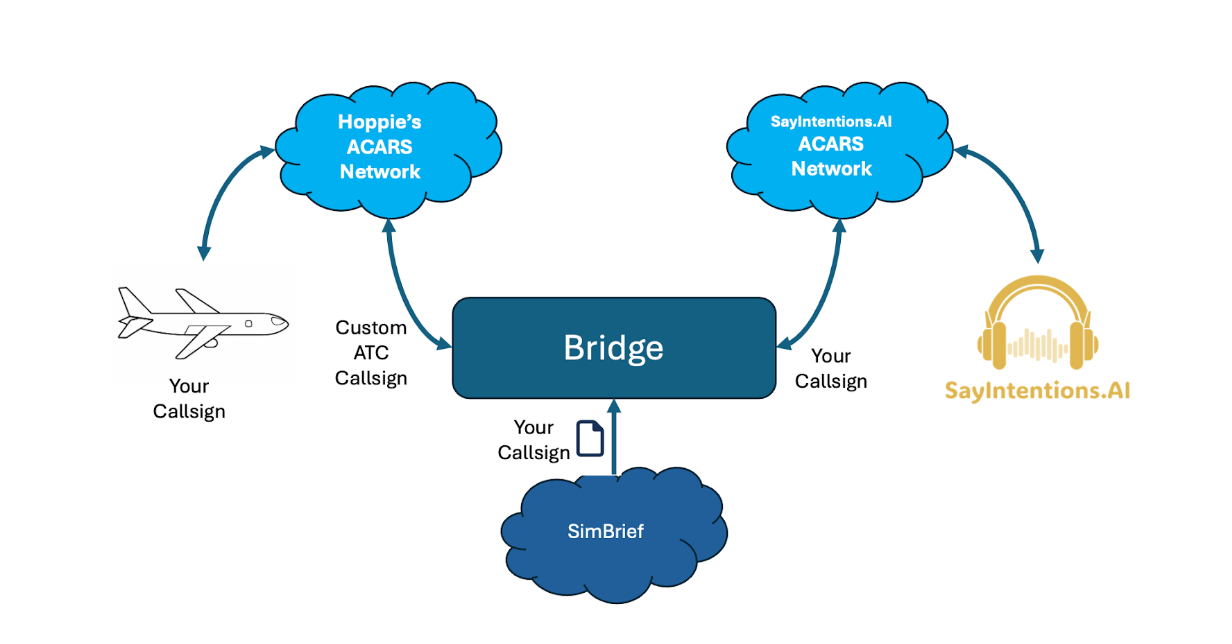
It has been built by Dave Black, to allow more pilots to use the SayIntentions.AI's ACARS network. It is available from:
https://github.com/daveblackuk/ACARS-BRIDGE/releases/tag/ACARS.V11
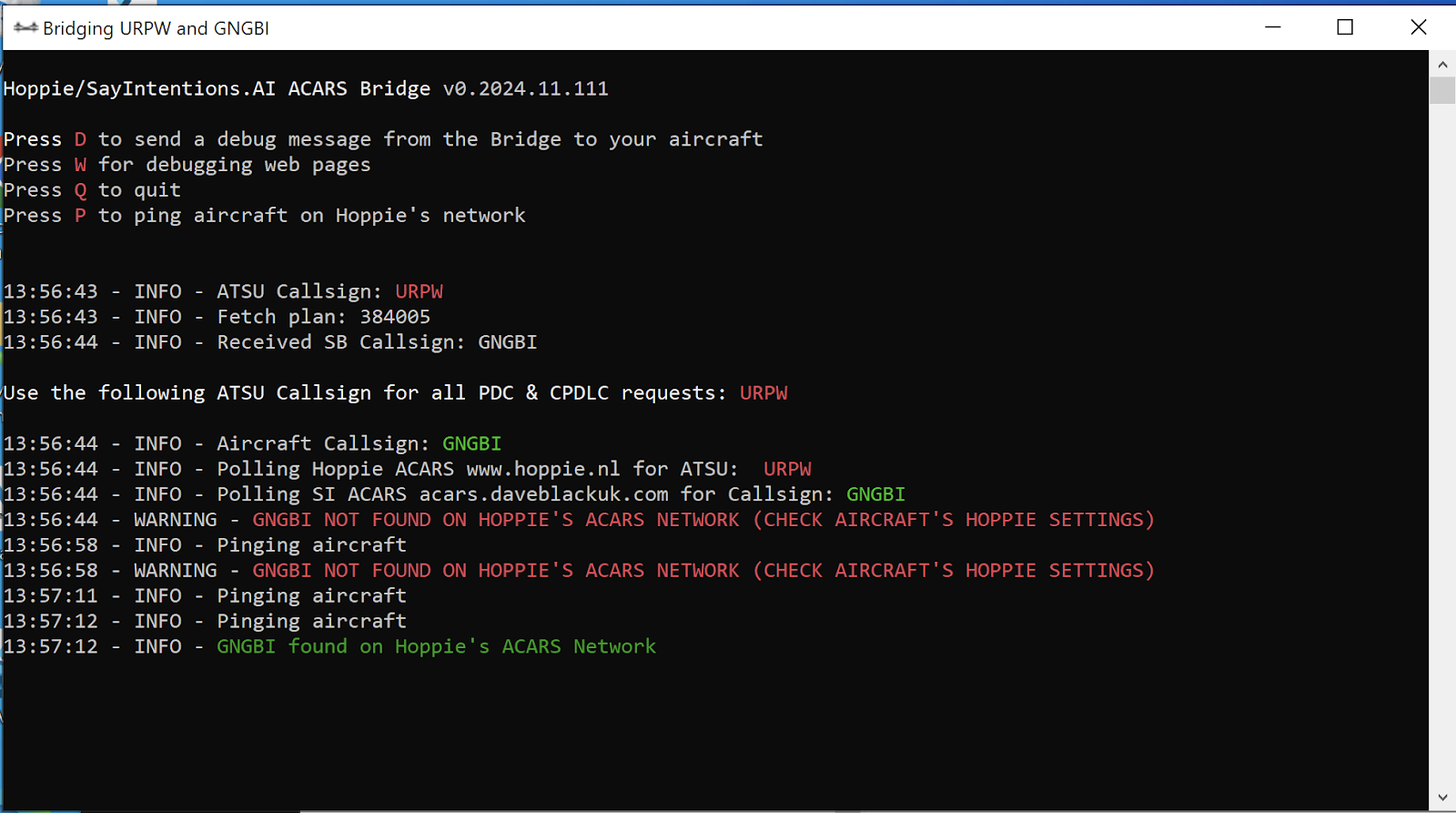
The bridge creates a unique 4-character ATSU callsign, allowing you to request a PDC or CPDLC response from the Sayintentions.AI's. ATC controllers whilst still using Hoppie’s network.
You can send CPDLC and/or PDC messages to this callsign from your aircraft, when signed onto Hoppie's ACARS network.
The bridge polls Hoppie’s network for messages for this callsign, and polls the Sayintentions.AI's ACARS network for messages to the callsign in your latest SimBrief plan. It then forwards these messages onto their respective networks.
Do I lose anything by using it?
You gain far more than you lose; a few things to consider?
You will be able to both send/receive ACARS/CPDLC messages to/from any station on Hoppie’s network.
You can only send/receive messages to/from SayIntentions.AI ATC controllers on their network.
If you are using an ACARS connected Virtual Airline, make sure they are connected to Hoppie’s network. They will send messages directly to your callsign. You cannot send messages to a VA that is only connected to SayIntentions.AI.
If you start on an ACARS network using the bridge then stay with it throughout the flight . If you plan to use the VATSIM to SayIntentions.AI handoff, then continue to use the bridge for CPDLC.
Many aircraft get their weather from a number of sources; this includes real world sources, VATSIM etc. If you use the bridge it is recommended that you use either voice ATIS, the SayIntentions.AI App or alternative tools such as VSR to get the ATIS for a SayIntentions.AI airport.
The bridge does not support handovers, as the aircraft needs to use the same ATSU logon for its entire flight. This does not affect CPDLC functionality.
Further support
Check the github at https://github.com/daveblackuk/ACARS-BRIDGE for operational, configuration and debugging information.
Was this article helpful?
That’s Great!
Thank you for your feedback
Sorry! We couldn't be helpful
Thank you for your feedback
Feedback sent
We appreciate your effort and will try to fix the article